KR EN

interCAD® Editor

The ECAD design solution that completes complex PCB design faster
and more accurately

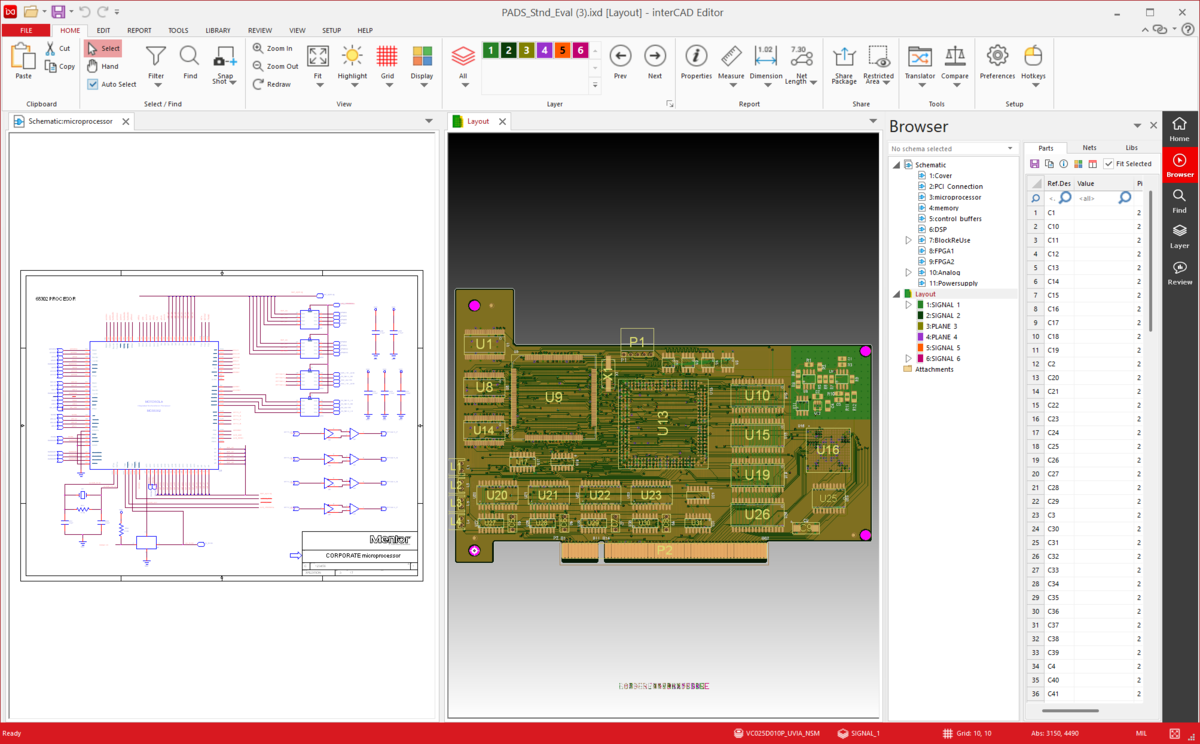
interCAD Editor screen

Why interCAD Editor?

Complex PCB Design Environments,
Unified in One Platform

From data compatibility and design review to security challenges across heterogeneous ECAD environments,
interCAD Editor connects every stage from design to sharing and review in one seamless workflow.

01Problem

Heterogeneous ECAD Environments
Make Data Compatibility a Challenge

Every EDA tool has its own structure and format, causing conversion errors and rework when sharing or reusing design data.

Solution

check_circle Translator-based conversion for heterogeneous ECAD data check_circle Broad PCB and Schematic data compatibility

02Problem

Reviewing Changed Design Data
Quickly Is Difficult

Manual comparison of revised designs extends review time and increases the risk of missing critical changes.

Solution

check_circle Instantly visualize changed areas with the Compare feature check_circle Layer-level and object-level design comparison

03Problem

Secure Data Sharing and Collaboration
Is Hard to Manage

Sharing raw design files in external collaboration raises the risk of data leaks and unauthorized access.

Solution

check_circle IXD-based lightweight shareable file generation check_circle Encryption and permission-based security controls
Feature 01 · Create IXD

Any EDA Format,
Unified into One Shareable Format

Unify diverse ECAD data into a single IXD format,
so you can review and share from the same data even when design environments differ.

  • Multi-ECAD Format Integration

    Consolidate diverse design data into a single unified format.

  • Lightweight Design Data Sharing

    Share even large PCB datasets in a lightweight format to boost collaboration efficiency.

  • No Original Design Tool Required

    View and review design data with just the IXD file, with no authoring tool needed.

Explore IXD Solution arrow_forward
Feature 02 · Re:Viewer

Review and Analyze
Complex Design Data at Speed

Open PCB, Schematic, Gerber, and ODB++ data without the original design tool,
in an efficient and streamlined review environment.

  • Real-time Cross-Probing

    Instantly navigate between Schematic and PCB layout objects in real time.

  • Design Review and Markup

    Add comments and markup directly on design data to improve collaboration efficiency.

  • Highlight and Report

    Quickly locate specific components and net information even in complex design data.

Explore Re:Viewer Solution arrow_forward
Feature 03 · Security

Share and Protect
Critical Design Data Securely

Share design data as encrypted packages
to reduce the risk of data leaks during external collaboration.

  • Encryption-Based File Protection

    Set a password on design data so only authorized users can access it.

  • Access Period and Permission Control

    Define file access periods and user permissions to strengthen security.

  • Screen Capture and Recording Prevention

    Restrict screen capture and recording to prevent design information leaks.

Explore Security Solution arrow_forward
Feature 04 · Compare

Quickly Spot the Difference
in Changed Design Data

Visually compare changes across PCB, Gerber, and ODB++ data
to review design revisions quickly and accurately.

  • Layer- and Sheet-Level Comparison

    Compare entire Layers/Sheets, or select specific Layers/Sheets for focused comparison.

  • Property Compare

    Compare component and Net property data in list form to catch changes that graphics alone may not reveal.

  • Graphical Change Analysis

    Intuitively identify changes to Traces, Pads, and Vias.

Explore Compare Solution arrow_forward
Feature 05 · Translator

Convert Across Different
ECAD Environments with Precision

Convert PCB data between ECAD tools
to improve data compatibility and workflow efficiency without redesign.

  • Heterogeneous ECAD Data Conversion

    Supports conversion between major formats including Allegro, PADS, and Zuken.

  • Library and Property Preservation

    Retain component properties and library information to minimize data loss.

  • Minimize Design Rework

    Leverage existing design data as-is to reduce turnaround time.

Explore Translator Solution arrow_forward

Additional Features

Additional Features

settings_suggest

Automation

User-defined macros and automation for repetitive tasks

auto_fix_high

Wizard

Automatic ECAD library generation based on component shape data

Product Comparison

Compare the features of
interCAD® Reader and Editor.

Category Function interCAD® Reader FREE interCAD® Editor
Viewer
IXD / Gerber / ODB++ / DXF check check
PCB Layout / Schematic remove check
Compare
IXD vs IXD / Gerber / ODB++ Partial check
Gerber vs Gerber / IXD / ODB++ check check
ODB++ vs ODB++ check check
PCB vs PCB / Gerber / ODB++ remove check
Schematic vs Schematic remove check
Review
IXD Review check check
Gerber Review check check
ODB++ Review check check
Schematic Review remove check
PCB Review remove check
Additional Features
Save IXD check check
Cross-Probing check check
Report Partial check
Optional Add-ons 🔒
Translator
(Allegro / Xpedition / PADS / Board Station / Zuken / AutoCAD)
remove 🔒 Add-on
Security remove 🔒 Add-on
Automation remove 🔒 Add-on

Items marked with 🔒 require separate purchase.

FAQ

Have a Question?

interCAD, Start Your Free Trial Today!

Familiar environment, powerful performance. Get started with just one click.

Free Trial
Contact us KakaoTalk TOP